Building KGlance: My First C++ Project
My first C++ project, a 147KB KDE Plasma popup, and the Wayland, D-Bus and packaging lessons that came with it.
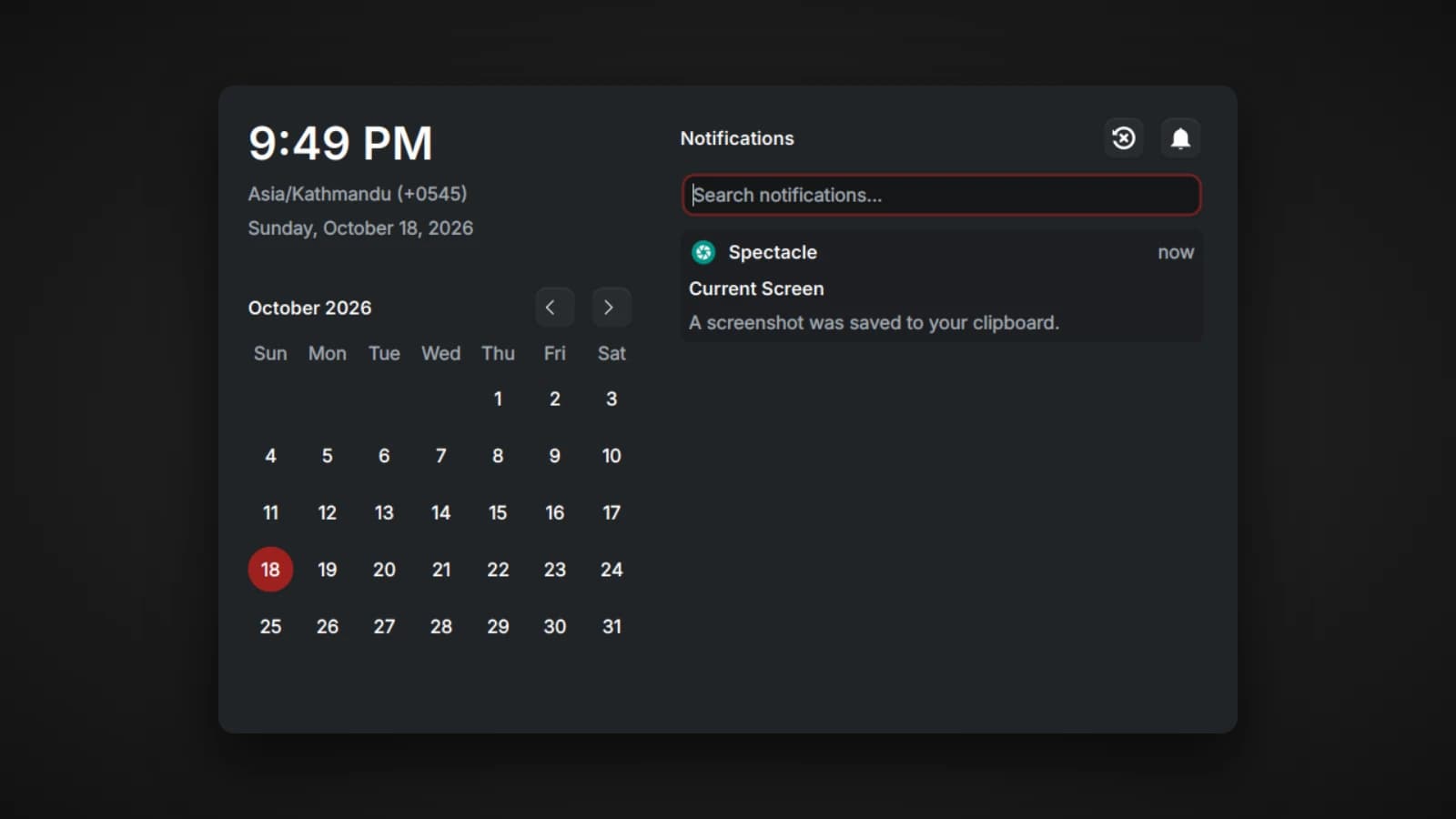
KGlance was my first C++ project, and it was hard. Not hard in the sense of a big codebase, since the finished binary is about 147KB, but hard in the sense that almost every assumption I started with turned out to be wrong somewhere between Qt, Wayland, D-Bus and Linux packaging. This article walks through what I built, the problems that took the longest to understand, and what I would tell myself before starting.
What KGlance is
KGlance is a small popup for KDE Plasma 6 on Wayland. Press a global shortcut and it appears. Click anywhere else or press Escape and it disappears. Inside it you get the local time, a world clock, a calendar you can flip through, and a live history of your recent notifications with search, a real Do Not Disturb switch and a real Clear All.
The reason it exists is simple. On KDE, checking the clock, the calendar or what notification just flashed past means opening the system tray and clicking around. KGlance turns that into one shortcut.
The design goal I cared about most was cost. A popup you open twenty times a day should be close to free, so KGlance reuses everything Plasma already provides: its theme colors, its icons, its global shortcut system, the D-Bus session and even the Digital Clock widget's settings. It duplicates as little as possible.
What it actually costs
Measured in a real Plasma 6 Wayland session:
- About 17MB of private memory while idle. This is the number that matters, because it excludes shared library pages that Plasma already has loaded.
- A stripped Release binary of about 147KB.
- About 25MB in systemd's own memory accounting for the running service, which fits the same reasoning about shared pages.
If you measure memory yourself, look at Private_Dirty rather than raw RSS. RSS counts shared libraries that every Qt app on your desktop already shares, so it makes a small app look much heavier than it is.
PID=$(pgrep -f kglance | head -1)
grep -E "Rss|Pss:|Private_Dirty" /proc/$PID/smaps_rollup
The architecture, piece by piece
The popup surface, and a KWin quirk
The window uses Qt 6 Widgets rather than QML, together with LayerShellQt, the same Wayland layer-shell mechanism that KRunner and Plasma's own on-screen displays use. That is what lets it float above everything without behaving like a normal window.
My first version left the surface unanchored so it would sit in the middle of the screen. Instead, KWin stretched it across the entire output, no matter what size I asked for. I spent a long time assuming my code was wrong, until I proved that setDesiredSize() really was receiving a correct, non-zero size. The behavior came from the compositor, not from my client.
The fix was to anchor the surface to the top edge only and centre it myself. Whenever the surface moves to another screen, KGlance recalculates the top margin as half of the screen height minus half of the panel height.
On Wayland you also cannot ask where the cursor is. QCursor::pos() returns stale values, often (0, 0), so it cannot be used to pick the active screen. Instead KGlance sets wantsToBeOnActiveScreen(true) and lets KWin decide, then reacts to the screen change.
The global shortcut
The shortcut goes through KGlobalAccel, with Meta+` as the default. Because it registers like any other application shortcut, people can remap it in System Settings under Shortcuts. I did not have to build any settings screen for it, which is exactly the kind of reuse I was aiming for.
The world clock, borrowed from Plasma
Most people who want a world clock on KDE have already chosen their cities in Plasma's Digital Clock widget. So KGlance reads that configuration directly through KConfig instead of asking you to set the cities up twice. It reads the configuration fresh every time it opens, so changes you make in Plasma's own clock simply appear.
If you want a list that only KGlance uses, a small worldclocks.json file in its config folder takes priority.
Notification history: eavesdropping on D-Bus
This is the part that taught me the most.
Desktop notifications on Linux are D-Bus method calls to org.freedesktop.Notifications.Notify. KGlance does not replace the notification daemon. It listens passively, collecting each notification as it goes past.
My first attempt used Qt's QDBusConnection::connect(), and it never received anything. I eventually wrote a standalone test program to isolate the problem and confirmed that Qt's D-Bus layer only dispatches real D-Bus signals. A notification is a method call, so Qt silently ignores it, even with an eavesdrop match rule in place.
The approach that works is dropping down to the raw libdbus-1 C library: add a match rule with eavesdrop='true', attach a filter function, and run it on its own low-priority QThread. The thread parses each notification and hands the fields back to the main thread with a queued signal, so the UI never blocks.
A Do Not Disturb that really works
A Do Not Disturb toggle that only hides notifications inside KGlance would be useless, since Plasma would keep showing its popups. The real notification daemon on Plasma is owned by plasmashell, and it exposes the standard Inhibit and UnInhibit methods. KGlance calls those, and I checked that the daemon's Inhibited property really flips.
One safety detail: KGlance always calls UnInhibit when it shuts down, so a crash cannot leave your whole desktop stuck in Do Not Disturb.
Clear All, and matching replies to calls
Closing a notification for real means calling CloseNotification(id) with the ID that Plasma assigned. The problem is that the Notify call KGlance overhears does not contain that ID. Only the reply to the call does.
The solution was to also eavesdrop on method replies coming from plasmashell, whose unique bus name KGlance looks up once at start-up, and to match each reply to its original call using the D-Bus serial number. Once the two are paired, KGlance knows Plasma's ID for every notification it has seen, and Clear All can close them properly.
Icons
Notification icons come from the hints dictionary of each call. Many apps send their icon as raw pixels, which is how favicons and avatars arrive, and others send a file path. KGlance handles both and falls back to Plasma's standard bell icon when there is nothing usable.
Keeping it cheap at runtime
- Clock timers only run while the panel is visible. They pause on hide and resume on show.
- The listener thread runs at the lowest priority, and its dispatch timeout went from 200ms to 3 seconds. That alone cut periodic wake-ups by about fifteen times.
- Release builds strip debug symbols with a single linker option, which shrinks the binary without changing what gets logged.
- Crash recovery is handled by systemd, not by code inside the app. More on that below.
Bugs worth remembering
None of these were dramatic, but each one cost me real time, and they are easy to fall into.
- Every notification appeared twice. In Qt, creating a
QListWidgetItemwith the list as its parent already inserts it. I was also callinginsertItem()afterwards, so each item went in twice. The fix was to create the item without a parent and insert it exactly once. - Notification rows overlapped their text. I read each row widget's size hint before word wrap had been calculated against its final width, so rows came out too short. Setting the fixed width and calling
adjustSize()before reading the size fixed it. - The full-screen popup from the layer-shell section above.
- Every Fedora build failed in the same way. See the packaging section. The lesson there was bigger than the bug.
Choosing how to ship it
Writing the app was half the work. Getting it onto other people's machines was the other half, and several obvious options turned out not to fit.
- Flatpak and Flathub: ruled out completely. Flatpak's D-Bus proxy deliberately blocks eavesdrop match rules for sandboxed apps. That is intended, hardened behavior, and a past security advisory was about a way around that block. It breaks KGlance's notification history entirely. The only workaround is giving the app the whole session bus, which defeats the point of the sandbox and would rightly draw heavy review. Native packages keep every feature with no compromise.
- KDE Invent: not yet. Hosting there means going through KDE's review and incubation process, with commitments that suit a mature, multi-contributor project more than a personal utility at this stage.
- store.kde.org: not a real fit. It is built for Plasma widgets, themes and wallpapers, not compiled apps with their own dependencies. It has no dependency resolution and no automatic updates.
- Discover listing: later. A proper Discover card needs AppStream metadata and screenshots. Updates through apt work in Discover either way, so this only affects discoverability.
The path I chose was a Launchpad PPA for Ubuntu and Debian, COPR for Fedora, and an AUR package for Arch, which is ready and waiting for AUR registration to reopen.
Packaging for Ubuntu: lessons from the PPA
The Debian packaging itself is small. debian/rules is just the standard debhelper one-liner, and debhelper detects the CMake build and installs whatever CMakeLists.txt already declares: the binary, the desktop entry, the systemd user unit and the icon. The trouble was all in the details.
debian/rulesmust be executable. Easy to forget, confusing when it fails.- Target the Ubuntu release codename, not
unstable.unstableis for uploads to Debian itself. A PPA wants the Ubuntu series name you are building for. - Clean your working tree before building the source package.
dpkg-sourcepackages whatever is physically on disk, not just what git tracks. A leftoverbuild/folder or a stray file produces errors about binary file contents changing. - Do not commit debhelper's generated files. The
postinstandpostrmsnippets it creates for systemd are regenerated on every build. - Sign with the key fingerprint, not a name. If your GPG key's user ID contains an extra comment, signing by name can fail with "No secret key" even though the key is right there. Passing the fingerprint avoids the mismatch entirely.
A PPA needs a source package, because Launchpad compiles it on its own build machines. Since the debian/ folder lives in the same repository as the code, I generate the original tarball straight from the release tag:
git archive --format=tar.gz --prefix=kglance-0.1.0/ v0.1.0 \
  -o ../kglance_0.1.0.orig.tar.gz

dpkg-buildpackage -S -sa -k<YOUR-KEY-FINGERPRINT>
dput ppa:lusan/kglance ../kglance_0.1.0-1_source.changes
Before uploading anything, a local binary build is a quick sanity check, and ldd on the extracted binary confirms that every library resolves:
dpkg-buildpackage -b -uc -us
dpkg-deb -x ../kglance_0.1.0-1_amd64.deb /tmp/kglance_test
ldd /tmp/kglance_test/usr/bin/kglance | grep "not found" || echo "all resolve"
Setting up Launchpad signing
Two things surprised me here:
- Launchpad does not accept a pasted public key. You publish your key to a public keyserver, then give Launchpad the fingerprint and it fetches the key itself.
- The ownership check is strict about every byte. Launchpad gives you a paragraph to clear-sign, and a "Bad signature" error almost always means the text you signed differs slightly from the original, usually by whitespace. Copying through the system clipboard instead of retyping avoids it. On Wayland,
wl-pasteinto a file and thengpg --clearsignworks reliably.
Also worth knowing: a brand-new PPA can return a 403 error for a while before its first build is published, because Launchpad has not finished creating the archive's signing key yet. It is not a configuration mistake, and it resolves itself.
Packaging for Fedora: the bug that taught me the most
On COPR I pointed the project directly at the GitHub repository and a release tag, with the spec file in the repo, and let COPR build from source.
The first build failed on every single build target with the same error: Fedora, RHEL, CentOS, openSUSE, and every other distribution I had ticked.
+ cd kglance-0.1.0
cd: kglance-0.1.0: No such file or directory
My first instinct was that each distribution needed different package names, which is a real problem in Linux packaging. It was not the cause. GitHub's release archive unpacks into a folder named after the repository, KGlance-0.1.0 with a capital K, while the RPM package name is lowercase, and %autosetup assumes the two match. The fix was one line:
%prep
%autosetup -n KGlance-%{version}
The lesson I keep coming back to: when something fails identically across completely unrelated environments, the cause is almost certainly shared and simple. Different distributions failing in different ways points to distribution-specific problems. Every distribution failing in exactly the same way points to something they all have in common, and that is where to look first.
Because COPR was pinned to the broken tag, the fix needed a new packaging-only release, v0.1.1. After that I trimmed the targets to Fedora only, since other families name their KDE packages differently anyway.
Starting at login, and recovering from crashes
Instead of a normal autostart entry, KGlance ships a systemd --user service with Restart=on-failure. A plain autostart entry launches the app once at login and never again, so a crash in the middle of a session would leave you without it. With systemd, a crash means a restart two seconds later, and I did not have to write any crash-handling code inside the app.
On Ubuntu, debhelper generates the code that enables the service during installation, so it starts with every graphical session automatically. To start it right away without logging out:
systemctl --user start kglance.service
systemctl --user status kglance.service
What I would tell myself before starting
- Prove where a bug lives before fixing it. The layer-shell issue and the D-Bus issue both looked like my mistakes. Small isolated test programs showed they were not, and saved me from "fixing" code that was already correct.
- Reuse the platform. Every feature that borrowed from Plasma, from the shortcut to the world clock to the Do Not Disturb switch, ended up smaller and more reliable than anything I would have built myself.
- Measure the right number. Private memory, not RSS.
- Packaging is real engineering. It took as long as the app, and it taught me as much.
Try it
On Ubuntu or Debian:
sudo add-apt-repository ppa:lusan/kglance
sudo apt update
sudo apt install kglance
On Fedora:
sudo dnf copr enable lusan/kglance
sudo dnf install kglance
The source code, build instructions and the Arch package are on GitHub at github.com/Lusan-sapkota/KGlance.