NoteSpark: My First Real Mobile App
An offline-first Android notes app with no accounts, no tracking and no ads, and my first shipped mobile app.
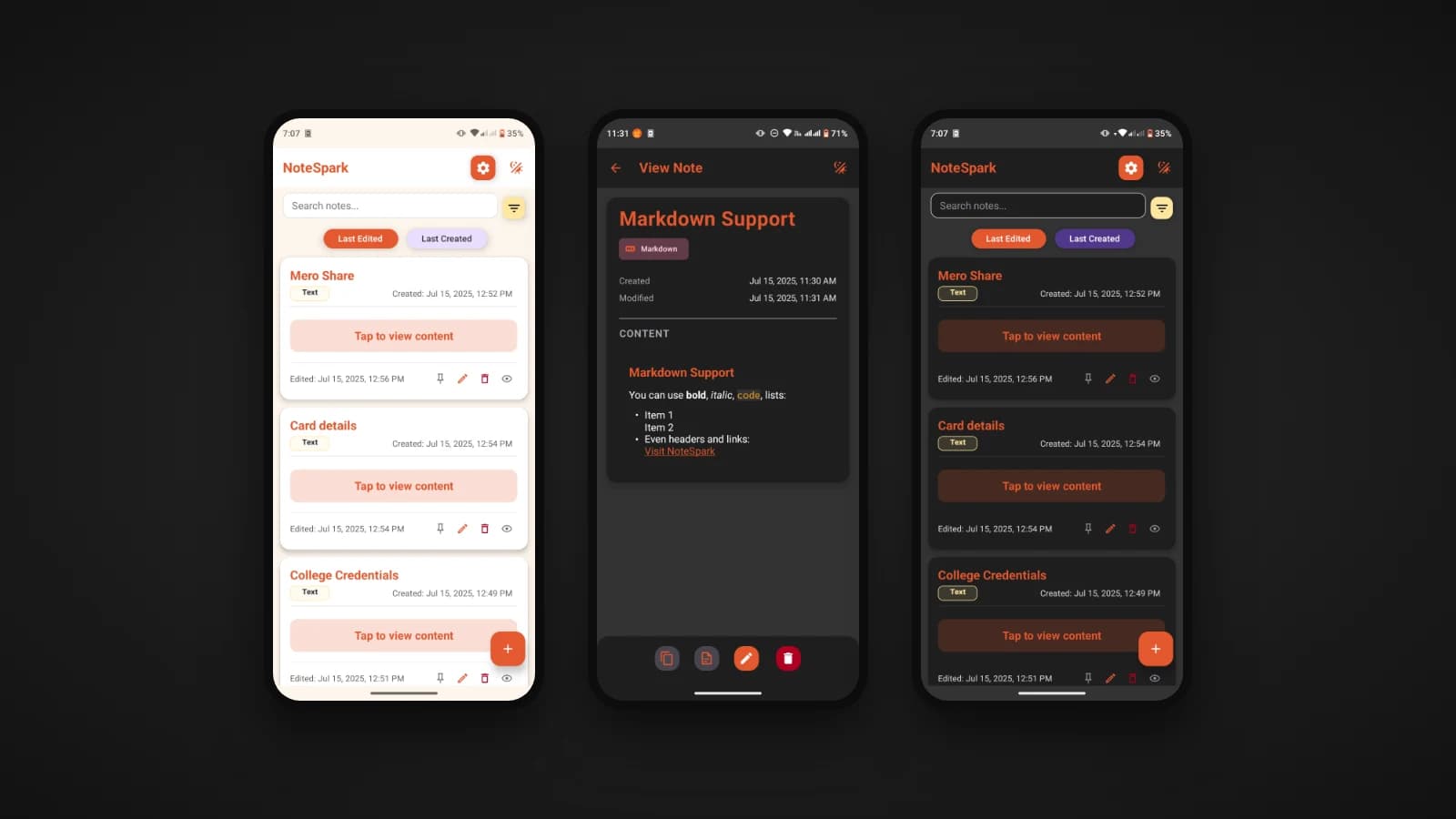
NoteSpark is the first real mobile app I built and shipped. Before it, I had built plenty of web apps and backends, but never something that lived on a phone, installed by real people outside a browser. I wanted a notes app that was fast, worked without the internet, and asked nothing of the person using it: no account, no tracking and no ads.
I was nervous the whole way through, and not in just one way. I was nervous about the code, because a phone is far less forgiving than a browser tab: there is no refresh button to hide behind when something goes wrong. And I was nervous about the phone itself, about handing my notes to an app I had written and trusting it not to lose them. So before I released anything, I made NoteSpark my own notes app and used it every day for quite some time. Every idea I jotted down and every list I kept went into it. I wanted to feel what a real user would feel, the small frustrations and the quiet worry about whether my words would still be there tomorrow.
They were. Only after that long stretch of trusting it with my own notes did I feel ready to let other people trust it with theirs. I released it as version 1.0.0 and published it on GitHub and SourceForge, still a little nervous, but proud.
What NoteSpark is
NoteSpark is an offline-first notes and ideas app for Android, built with Expo, React Native and TypeScript. Everything is stored on your device. It never needs a connection, and your notes never leave your phone.
- Write in Markdown or plain text, switching between them whenever you like, with a live preview for Markdown.
- Find things quickly with search across titles and content, sorting by when a note was created or last edited, and filters.
- Pin important notes so they always stay at the top.
- Attach images to notes, and links in your notes are detected and made clickable.
- Back up and restore with import and export, plus a history of past imports and exports that you can save as a PDF.
- Copy and share a note's content with other apps.
- Light and dark themes, with a clean, minimal design.
Why offline-first
A notes app holds some of the most personal things people write down. Most of the time, none of it needs to touch a server. Building NoteSpark offline-first meant every feature had to work with the phone in airplane mode, and that constraint made the app simpler, faster and more private all at once. There is no sign-in screen, no loading spinner waiting on a network, and nothing to leak.
The trade-off is that your notes live on one device. That is why import and export matter so much here: they are how you keep a backup and move your notes to a new phone.
Built with Expo and React Native
Coming from web development, React Native let me bring what I already knew, React and TypeScript, to a phone. Expo made the rest of the jump manageable. It gave me ready-made modules for the native features a real app needs: picking images and documents, accessing the photo library, sending notifications, printing to PDF and sharing to other apps. The interface uses React Native Paper for consistent Material Design components, with React Navigation moving between the home screen, the editor, the note view, settings and import and export.
What my first mobile app taught me
- A phone is not a small browser. Navigation, the back button, safe areas around notches, and permissions for photos and notifications all work differently from the web, and each one needed real thought.
- Native features are where an app gets real. Writing and listing notes is the easy part. Images, sharing, notifications and exporting to PDF are what make it feel like a proper phone app, and that is where Expo's modules helped most.
- Offline-first simplifies more than it costs. Removing the network removed whole categories of problems: accounts, sync conflicts and loading states.
- Shipping is its own skill. Building a release, packaging it and putting it somewhere people can download it, on GitHub and SourceForge, taught me as much as writing the app did.
What comes next
The ideas I want to explore next all keep the same promise, that your data stays on your devices: a personal vault for sensitive notes, and syncing between your own devices without going through a cloud service. A landing page with a faster download option is also on the way.
Try it
Download NoteSpark from SourceForge or from the GitHub releases page. The source code is on GitHub at github.com/Lusan-sapkota/NoteSpark, under the GPL version 3, and contributions are welcome.