Kairon: The Desktop App That Taught Me Go
A local-first desktop planner, and the project where Go finally clicked.
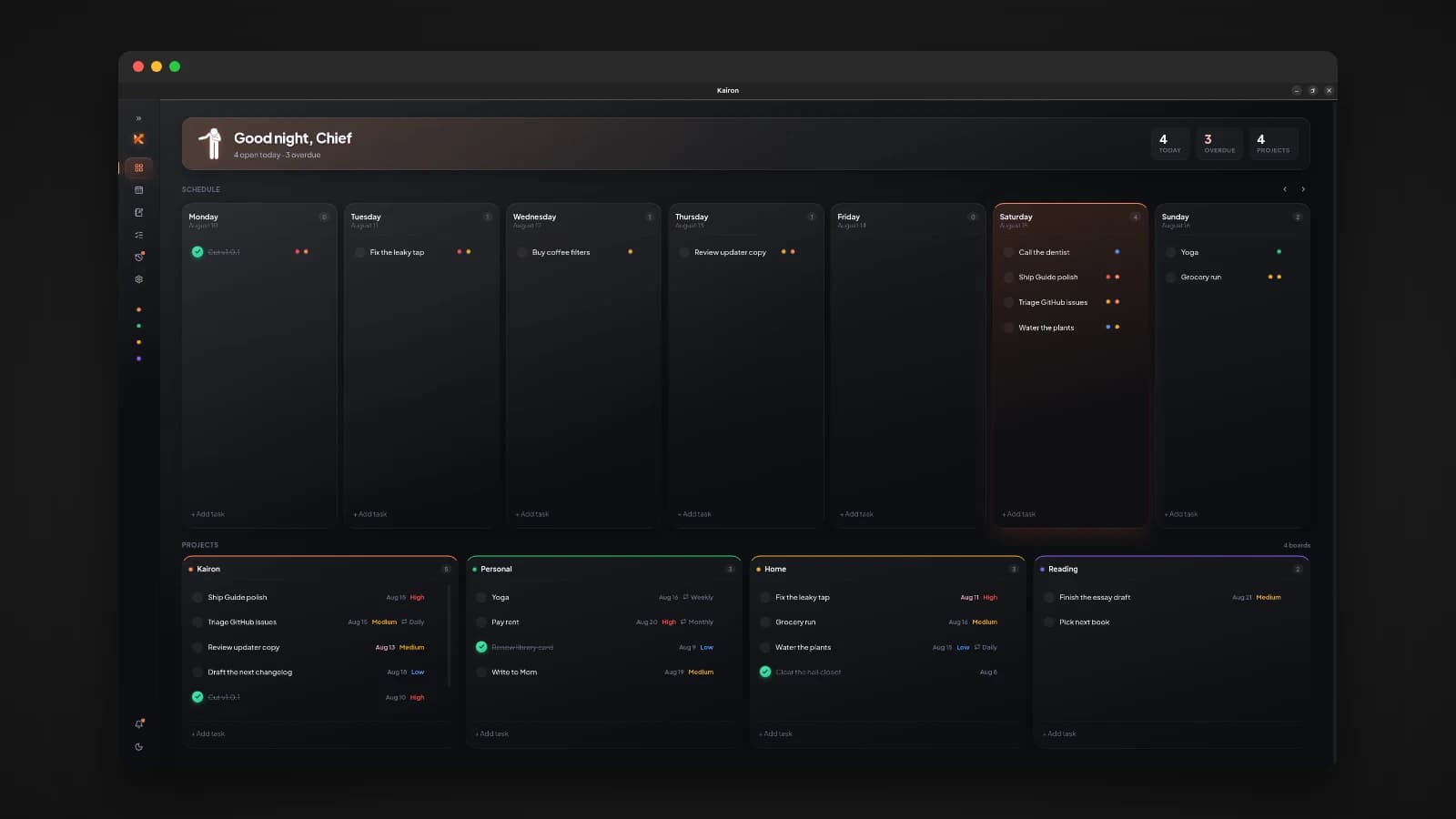
I learn best when I can see what I am building. Reading a language's documentation only goes so far for me. I need a window on the screen, something I can click, something that breaks in front of me. So when I decided to learn Go properly, I did not start with a command-line tool or a web API. I built a desktop app. That app became Kairon, and it is the project that taught me Go well enough to build Flint afterwards.
What Kairon is
Kairon is a local-first desktop planner. Tasks, projects, a week board, a month calendar and Markdown notes live together in one window, and everything is stored in a SQLite database on your own machine. There is no account, no sync and no feed.
The idea behind it is simple: planning should feel like sitting down at your own desk, not logging into someone else's cloud. Capture things quickly, see the week clearly, finish what matters, and leave the rest of the internet outside.
- Capture from a quick composer, a command palette on Ctrl+K, or straight onto the board.
- Organize with projects, tags, priorities, due dates and recurring tasks.
- Plan on a week board and a month calendar.
- Write Markdown notes that stay in sync with each task's notes.
- Get reminded through in-app and desktop notifications, with optional email reports over SMTP.
- Own your data with backup, restore and wipe, all local.
It runs on Linux, Windows and macOS, with a .deb package, a standalone Linux binary, a Windows executable and a universal macOS app.
Why Wails
Kairon is built with Wails, which lets you write a desktop app's backend in Go and its interface in web technologies, rendered by the operating system's own web view. For someone who wanted a visible UI while learning Go, it was the perfect fit. I could build the interface with React and TypeScript, which I already knew well, and spend all my learning energy on the Go side.
It also keeps the app small compared to bundling a whole browser, the way Electron apps do, because the window uses the web engine the system already has.
The part that made Wails click for me is the bindings. You write ordinary exported methods on a Go struct, and Wails generates typed TypeScript functions that call them. The frontend wraps those in one small typed API file, so calling the backend from React feels like calling any other function, with the types checked on both sides.
What Go taught me here
A planner looks simple from the outside. Building one properly meant touching a surprising amount of real backend work, and each piece taught me something about Go.
- Structs and methods as the API. The whole backend is a set of methods on one app struct, bound straight to the interface. It taught me to design small, clear functions, because every one of them became a call the frontend depended on.
- Owning a database. Kairon creates its schema and runs migrations automatically on startup, so updating the app never breaks an existing database. Getting that right taught me to think about data that outlives the code that wrote it.
- Recurring tasks. Working out when a repeating task comes due next is fiddlier than it sounds, and Go's time handling forced me to be precise about dates.
- Background work. Notifications and scheduled email reports run on their own, with a small queue for outgoing mail. This is where goroutines and timers stopped being concepts and became tools I actually understood.
- Shipping to three operating systems. One codebase, built for Linux, Windows and macOS, including the details that differ between them, such as where each one keeps an app's data.
By the end, Go no longer felt like a language I was reading about. It felt like one I could build with.
From Kairon to Flint
Flint, my offline chat interface for local AI models, is a single Go binary with SQLite, serving its own interface. Almost every skill it needed, I had first learned on Kairon: designing a Go backend around a real interface, owning a SQLite schema and its migrations, running work in the background, and shipping something people can install. Kairon was where I learned the language. Flint is where I put it to work on a much harder problem.
That is the pattern I keep coming back to: build something I can see, learn the language by making it real, then take what I learned to the next project.
Try it
Download Kairon from the GitHub releases page. On Ubuntu or Debian:
sudo apt install ./kairon_*_amd64.debThen open Kairon from your app menu. Builds for other Linux distributions, Windows and macOS are on the same page, and the in-app handbook is under Settings, Guide. The source code is on GitHub at github.com/Lusan-sapkota/Kairon, under the MIT license.