SenseCenter: Where Rust Started to Click
Fans, RGB, battery, telemetry and firmware for Acer laptops on Linux, and the project where Rust clicked.
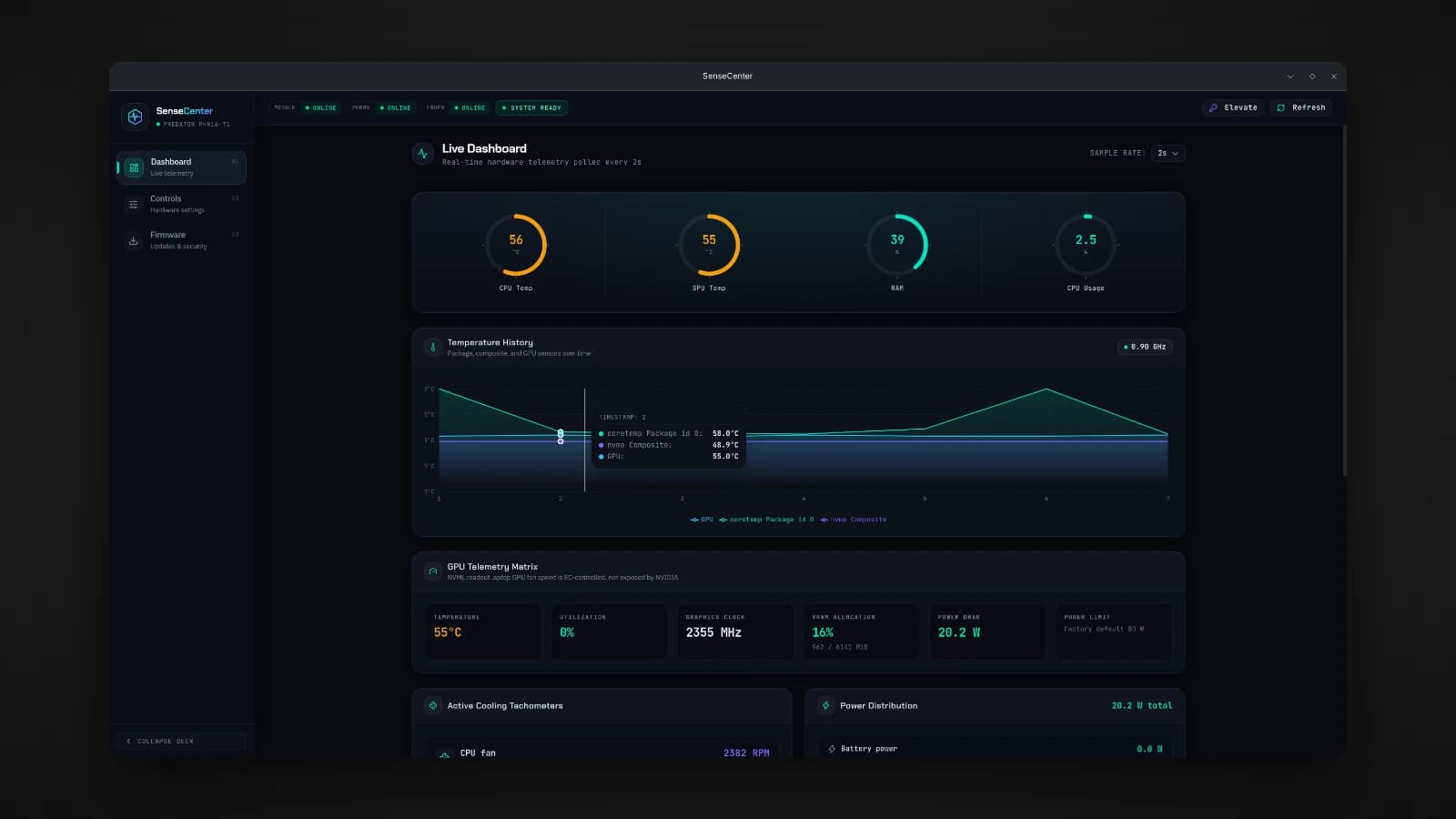
I use an Acer Predator laptop with Linux. On Windows, Acer's own app controls the fans, the keyboard lighting, the battery and the thermal profiles. On Linux, those controls exist thanks to a community kernel module called linuwu-sense, but I wanted something more: live telemetry to see what the machine was actually doing, and firmware updates, all in one native app. So I built SenseCenter.
I am still not good at Rust. But SenseCenter is the project where it genuinely started to click for me, and this article is about how it works and why.
What SenseCenter does
- Control: thermal profiles, fan modes (Auto, Max or Custom), the four-zone RGB keyboard with per-zone colors and effects, the battery charge limiter and calibration, USB charging, LCD overdrive, the boot sound, keyboard backlight timeout, screen brightness and wireless radios.
- Monitoring: CPU and GPU temperatures and fan speeds, CPU usage and frequency, NVIDIA GPU usage, clocks and power draw, RAM and swap, disk activity and space, and network throughput.
- Firmware: the list of devices from fwupd, firmware updates, and the system's hardware security score.
- Everyday comfort: a tray icon, starting at login, and one-click updates of the app itself.
Standing on linuwu-sense
SenseCenter does not talk to the hardware directly, and that was a deliberate decision. The linuwu-sense kernel module does the hard work of communicating with the laptop's firmware and exposes everything as files under /sys. SenseCenter reads and writes those files.
That split keeps the app safe and simple. Which laptops are supported, and which features each one gets, is decided by the driver, so if linuwu-sense supports your laptop, SenseCenter does too. A control your model does not expose simply does not appear. SenseCenter contains none of the module's code; it only uses the interface the module provides. I have tested it on a Predator PHN16-71 with an RTX 4050.
Why Tauri, and where Rust clicked
SenseCenter is built with Tauri: the interface is React and TypeScript, and the backend is Rust. After building Tick entirely in Rust, this split let me use Rust for the part where it really shines, talking to the system, and keep the interface in tools I already knew well.
The backend is organized into small modules, each with one job: reading and writing the driver's sysfs files, collecting telemetry, handling thermal profiles, talking to fwupd, managing privileged operations, and the in-app updater. Errors have their own module too.
This is where Rust started to make sense to me. Hardware is unreliable in ways a web app never is: a file might not exist on your model, a sensor might be missing, a permission might be denied, a driver might return something unexpected. Rust does not let you ignore any of that. Every operation that can fail returns a result you have to handle, and the compiler refuses to let a failure slip through unnoticed. In Tick, that strictness felt like friction. In SenseCenter, talking to real hardware, it felt like exactly what the job needed.
Asking for root once, not constantly
Some controls, like fan modes, need root access to write to the driver's files. Asking for your password every time you change a fan setting would make the app unbearable. Instead, SenseCenter asks once, through a single pkexec prompt, and that unlocks the root-only controls for the rest of the boot.
Staying out of the way
A monitoring app that uses noticeable resources to watch your resources would defeat its own purpose. So telemetry is only collected while the Monitor tab is open and the window is visible. When SenseCenter is minimized, in the tray or on another tab, it stops polling and does almost nothing. You can also choose the polling interval, and your choice is remembered.
Settings that survive a reboot
The laptop's firmware resets to its defaults on every boot. SenseCenter saves your control settings, such as fan mode, keyboard lighting, the battery limit and the toggles, and reapplies them the first time it opens after a boot. Turn on launching at login, and it starts quietly in the tray with no window, reapplies everything, and then sits idle until you need it.
I want to be clear about the limits: the thermal profile, screen brightness and wireless radios are not reapplied, and if autostart is off, your settings only come back once you open the app.
Updates that install themselves
SenseCenter ships as a .deb package and as an AppImage, and it can update itself from GitHub releases in either form. The .deb asks for your password to install the new version, and the AppImage simply replaces itself. Both restart on the new version afterwards.
What I learned
- Rust made sense once the problem needed it. Handling every failure felt like overhead in a task app, and felt essential when talking to hardware.
- Build on the right layer. Letting the kernel module own the hardware kept SenseCenter safe, portable across supported models, and focused on being a good app.
- Respect the user's machine. One password prompt per boot and no polling in the background are small decisions that decide whether people keep an app running.
- Be honest about limits. Saying exactly which settings come back after a reboot, and which do not, saves people from confusion later.
Try it
First, make sure the linuwu-sense module supports your laptop, is installed and loaded, and that your user is in the linuwu_sense group. Then download the .deb or AppImage from the GitHub releases page. On Ubuntu or Debian:
sudo apt install ./SenseCenter_0.1.1_amd64.debThe package also installs lm-sensors if it is missing. For firmware updates, install fwupd, and for GPU telemetry, the NVIDIA driver. The source code is on GitHub at github.com/Lusan-sapkota/SenseCenter, under the GPL version 3 or later.