TimeRing: My First Release on SourceForge
A small multi-timer desktop app, and my first step from GitHub repositories to a real public release.
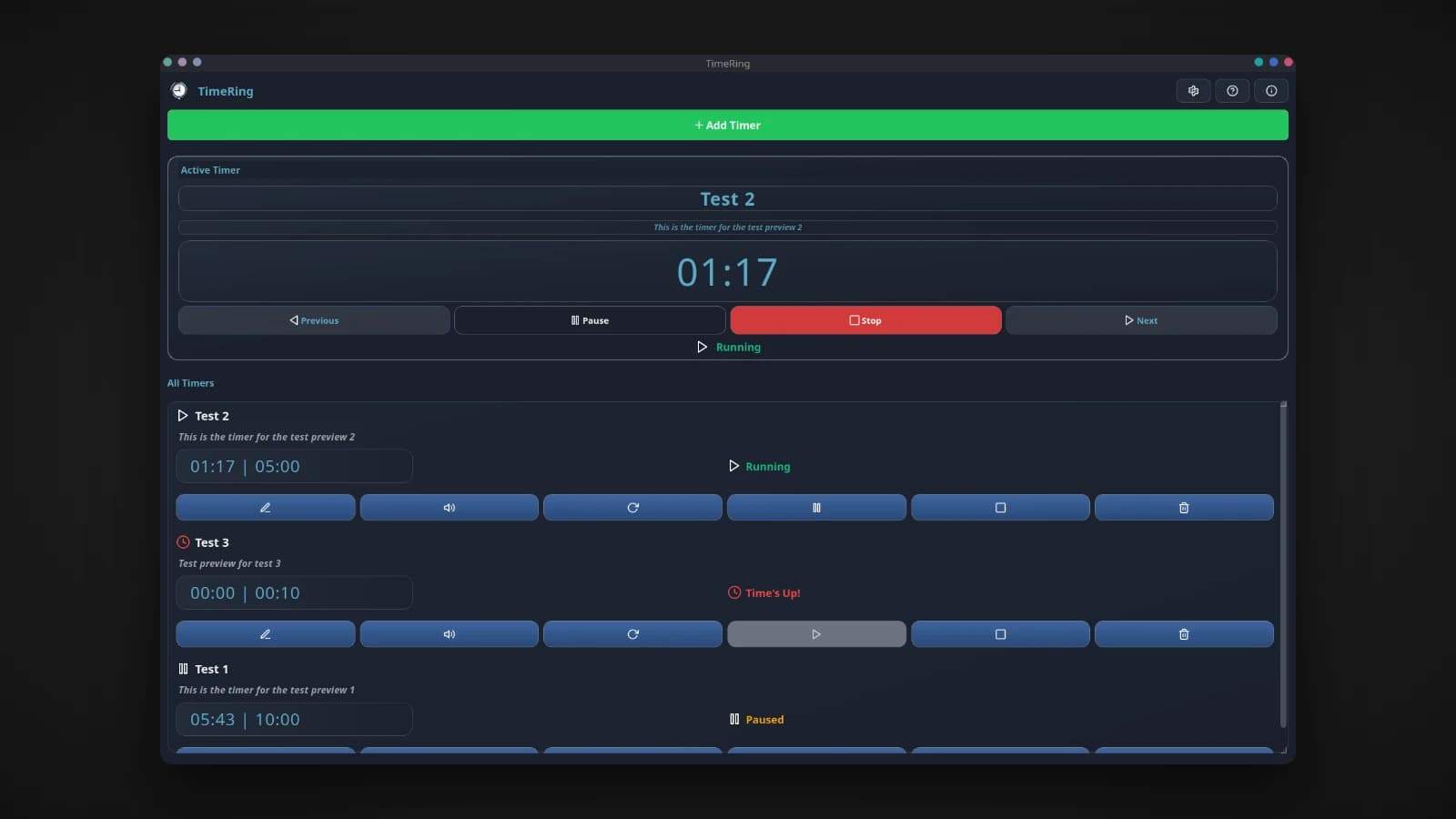
TimeRing is the first project I ever uploaded to SourceForge. Before it, my projects lived only in GitHub repositories. TimeRing was the first time I packaged something properly, put it on a public download site, and handed it to strangers as a finished app. It is a small desktop timer, but it was a big step for me.
What TimeRing is
TimeRing is a lightweight desktop timer app for Linux that runs as many timers as you need at the same time. It suits anything from Pomodoro work sessions and sprint tasks to cooking, study blocks and interval training.
- Multiple timers at once, each with its own name, an optional short description and its own sound.
- An active timer block at the top shows your current focus in large type, with Previous and Next to switch between running timers.
- Clear states: running, paused, ringing and finished, each with its own icon and color, so you can read every timer at a glance.
- Alarms you will not miss. Sounds can loop until you stop them, and desktop notifications work with KDE, GNOME and other Linux desktops, with a choice of urgency.
- Full control: pause, resume, stop, edit, change the sound, or rerun any timer from its original duration.
- Nothing lost on restart. Timers and settings are saved automatically and restored when you open the app again.
It also follows your system's icon theme, adapts to smaller screens down to 720p, and can be restyled with a Qt stylesheet.
How it is built
TimeRing is written in Python with PyQt5 for the interface, python-vlc to play alarm sounds, and requests for checking updates. Settings and timer states are stored as simple JSON files in your config folder, so they are easy to read, back up or reset.
Every timer ticks on its own while the interface stays smooth: the list keeps scrolling while it updates, and a finished timer can keep ringing without freezing the rest of the window. Keeping a desktop app responsive while several things happen at once is the kind of problem you only meet by building one.
Shipping it for the first time
Writing the app was only half of the work. To release it, I had to learn how to turn a Python project into something a person can install with one command: building a .deb package, making sure it launched from the app menu and the terminal, and writing instructions for people who would never read the code. Version 1.0.0 went up on GitHub and, for the first time, on SourceForge, where anyone could download it directly.
That first public release changed how I think about projects. A tool that only runs on your own machine is an experiment. A tool someone else can download, install and rely on is a product, and it has to be built with that person in mind. Later releases, from NoteSpark to the packages for KGlance, built on what this one taught me.
Try it
On Ubuntu or Debian, download the package from SourceForge and install it:
wget https://sourceforge.net/projects/timering/files/TimeRing_1.0.0.deb/download -O TimeRing_1.0.0.deb
sudo dpkg -i TimeRing_1.0.0.deb
timering
Or run it from source with Python:
git clone https://github.com/Lusan-sapkota/TimeRing.git
cd TimeRing
python3 -m venv venv && source venv/bin/activate
pip install -r requirements.txt
python3 main.py
TimeRing is on SourceForge and on GitHub at github.com/Lusan-sapkota/TimeRing, under the MIT license.